
Updated: 16 November, 2026
- Share
-

-

-

Most marketers have experimented with AI for writing content by now. A social media caption here, an email subject line there, maybe a blog outline when you're short on ideas.
Useful? Absolutely. But if that's all you're using Claude for, you're missing a much bigger opportunity.
Claude can support almost every stage of your marketing workflow, from developing campaign strategies and creating branded visuals to analyzing customer data and identifying opportunities to improve performance.
That was the focus of our recent CRO:NYX Digital webinar, The Modern Marketer's Guide to Claude. We explored how marketers can move beyond basic prompts and start using Claude as a practical partner across their day-to-day work.
Here are some of the most useful applications, along with tips for putting them into practice.
What Can Claude Do for Marketing?
Claude is an AI assistant developed by Anthropic that can help marketers research, plan, create, analyze and optimize their work. Rather than thinking of it as another content-writing tool, think about the different stages of a typical marketing campaign. You need to understand your audience, develop a strategy, create content, produce branded assets, launch the campaign and measure the results.
Claude can support you throughout that process.
Some of the most practical applications include:
- Marketing strategy: Developing campaign plans, audience profiles, messaging and channel recommendations.
- Content creation: Drafting coordinated email campaigns, social media content, landing pages and blog outlines.
- Creative design: Creating and refining branded marketing materials using Claude Design.
- CRM analysis: Using the HubSpot connector to explore customer information and identify marketing opportunities.
- Campaign optimization: Analyzing performance, identifying patterns and recommending experiments to improve results.
The real value comes from connecting these activities rather than treating each prompt as an isolated task.
Set Claude Up for Better Marketing Results
One of the biggest reasons marketers get generic AI outputs is simple: they haven't given the tool enough context.
If you hired a new marketing coordinator, you wouldn't expect them to develop an effective campaign without understanding your business, customers, brand and objectives.
Claude is no different.
Start with a Claude Project
Claude Projects let you create dedicated workspaces with background knowledge and instructions that can be used across related conversations.
For a marketing Project, we recommend including:
- Your company overview and marketing objectives
- Brand guidelines and tone of voice
- Target audience profiles
- Product or service information
- Current campaign briefs and relevant marketing resources
You can also establish Project instructions that tell Claude how to approach tasks, what standards to follow and how to present recommendations.
According to Anthropic's Project documentation, knowledge and instructions added to a Project can provide context across its conversations.
The result is less time explaining your business and more relevant outputs from the start.
Stop Asking. Start Briefing.
Good prompting is really an extension of good briefing.
Compare these two requests:
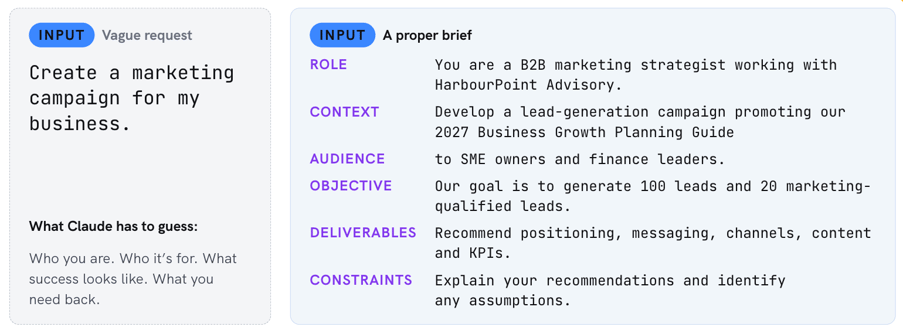
Basic prompt: "Create a marketing campaign for my business."
Better prompt: "Act as a B2B marketing strategist. Develop a lead-generation campaign for [business], targeting [audience], with the goal of [objective]. Recommend positioning, messaging, channels, content activities and KPIs. Consider our available budget and resources, explain your recommendations and identify assumptions."
The second prompt gives Claude something meaningful to work with.
A useful framework is:
Role + Context + Objective + Audience + Output
It doesn't need to be complicated. Just give Claude the same information you'd give a colleague or agency before expecting them to produce good work.
Use Claude to Turn Marketing Strategy into Action
Developing a campaign strategy is one thing. Turning it into a coordinated set of marketing activities is another.
Let's say you're launching a new service and want to generate qualified leads. You could start by asking Claude to develop a campaign strategy, including target audiences, positioning, key messages, recommended channels and measurable KPIs. Once you've reviewed and refined that strategy, you can use the same conversation or Project to develop the supporting materials.
For example, Claude could help create:
- A four-week content calendar
- A three-email lead-nurturing sequence
- LinkedIn posts tailored to your target audience
- Landing page copy
- A creative brief for campaign graphics
Because everything draws from the same strategy and brand context, it's easier to maintain consistent messaging across channels.
Of course, Claude's recommendations still need to be evaluated. Are the proposed channels realistic for your budget? Does the messaging reflect what your customers actually care about? Are the KPIs measurable?
Claude can accelerate the planning process, but marketing judgment is what turns a draft strategy into an effective one.
Claude Design: From Creative Brief to Branded Marketing Assets
One of Claude's more interesting developments for marketers is Claude Design.
Instead of simply asking AI to write a creative brief, you can use Claude to create visual assets and then refine them through conversation. That could include landing page concepts, branded one-pagers, social media graphics, presentation visuals and interactive prototypes.
The process is straightforward.
1. Start with a proper creative brief.
Tell Claude what you're creating, who it's for, what message it needs to communicate and what action you want the audience to take.
Include your brand guidelines, colours, typography and any visual references.
2. Review the first design.
Don't judge it purely on appearance. Consider whether the messaging is clear, the visual hierarchy makes sense and the design supports your marketing objective.
3. Refine through feedback.
Be specific about what should change.
During our webinar, we demonstrated this using a fictional B2B company's landing page.
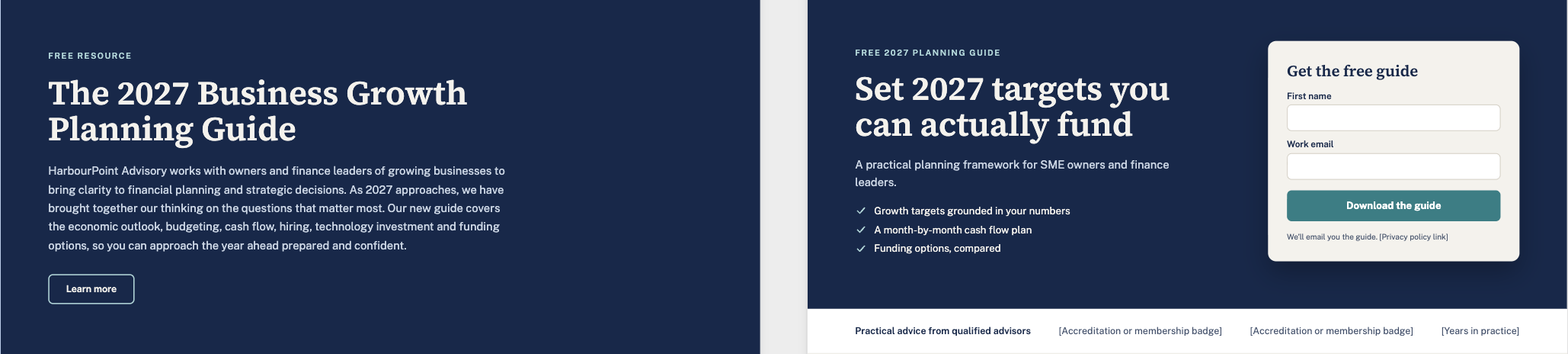
The first version looked professional, but the headline focused on the product rather than the benefit, the copy was lengthy, and the lead-capture form appeared at the bottom of the page with nine required fields.
We then asked Claude to strengthen the headline, simplify the copy, move the form higher and reduce the number of fields.
The revised version had a clearer value proposition and a more prominent conversion opportunity.
Would those changes guarantee better results? No. We'd still need to test the page.
But they demonstrate how AI can help marketers move quickly from a first concept to a more focused creative asset.
View Anthropic's Claude Design guide for more on creating and refining designs.
Claude + HubSpot: Turn CRM Data into Marketing Insights
This is where things get particularly interesting for teams already using HubSpot. With the official HubSpot connector for Claude, you can ask questions about accessible CRM data in plain language rather than always starting with a custom report or spreadsheet export.
For example:
"Which lead sources generated the highest proportion of marketing-qualified leads over the past 90 days?"
Claude can help retrieve the relevant information, compare performance and identify patterns worth investigating.
But the real value isn't just getting an answer. It's knowing what to do with it.
From Data to Action
Imagine your HubSpot data reveals that webinar attendees convert to marketing-qualified leads at a higher rate than general website enquiries.
That's useful information, but what happens next?
You could ask Claude to analyze the pattern, identify potential explanations and recommend a targeted follow-up strategy. That might include segmenting webinar attendees, developing a tailored email sequence and prioritizing follow-up with highly engaged prospects.

Or perhaps your latest email campaign has underperformed. Claude can help compare results, identify potential issues and suggest experiments to improve engagement. The important distinction is separating what the data actually shows from what might explain it.
An email with a higher click-through rate doesn't automatically prove its subject line was better. Audience, timing, content and other variables may have influenced the outcome.
Claude can help generate hypotheses, but marketers still need to validate them.
What About the Integration Itself?
The official HubSpot connector supports CRM analysis, record management and marketing-related workflows, with capabilities depending on subscriptions, permissions and enabled tools.
You'll need an active HubSpot account and a paid Claude subscription to use the connector. Access to specific information is governed by your HubSpot permissions.
We recommend starting with a simple analysis task and keeping human approval in place for actions that change records or trigger customer communications.
For a more detailed breakdown, read our article on what the HubSpot + Claude integration can do, including practical workflows and implementation considerations.
You can also follow HubSpot's official connector setup instructions.
Best Practices for Using Claude in Marketing
A few principles can make the difference between an interesting AI experiment and a genuinely useful marketing workflow.
Give Claude enough context. The better it understands your business, customers and objectives, the more relevant its recommendations can be.
Be specific about what you need. Treat prompts like proper briefs, with clear objectives, deliverables and constraints.
Challenge the outputs. Ask Claude to explain its reasoning, identify assumptions and suggest alternatives.
Keep a human in the loop. Review brand consistency, factual accuracy, data privacy and any actions affecting customers or business records.
Start with one workflow. Choose a repetitive or time-consuming activity, test whether Claude improves the process, and build from there.
You don't need to overhaul your entire marketing operation overnight. The best place to start is often one task your team already does regularly.
Get Started with Our Free Claude Guide
Want to start putting these ideas into practice?
We've created The Modern Marketer's Claude Guide, a free resource designed to help marketers get more from Claude.
Inside, you'll find:
- Nine copy-ready prompts for marketing strategy, content creation, Claude Design and HubSpot analysis
- A simple framework for writing better prompts
- Practical setup and quality-control checklists
- A seven-day action plan to help you build your first AI-assisted marketing workflow
Download the free guide and start working smarter with Claude.

Ready to Build Smarter Marketing Workflows?
Claude can help marketers work faster, think more strategically and make better use of their data. But the biggest opportunities come when AI is connected to the right systems, processes and business objectives.
As a HubSpot Diamond Solutions Partner, we help businesses get more from their CRM through strategy, integrations, automation and optimization. Contact us today to get started.

Other posts you may be interested in
How to Use Claude for Marketing: Strategy, Content, Design & HubSpot

AEO Case Study: More Than Doubling Conversions From AI Search in 12 Weeks by Auditing AI Answers, Claiming Credit, and Fixing What AI Already Trusted

CRO:NYX Digital Is Heading to HubSpot UNBOUND