
Published: 25 May, 2026
- Share
-

-

-

Setting up a new HubSpot portal can be daunting: What properties to use? What pipeline stages? Custom objects or standard?
To help take the uncertainty out of your new HubSpot portal setup, we've created a list of common configurations that we've seen work well across our finance clients' HubSpot accounts.
Contact, Company & Deal Properties
Contact Properties
- Client Type: Multiple Checkboxes - Individual, NHW, Institutional, Corporate
- Assets Under Management: Currency
- KYC/AML Status: Dropdown - Pending, Verified, Flagged
- KYC/AML Renewal Date: Date Picker
- Risk Tolerance: Dropdown - Conservative, Moderate, Aggressive
- Investment Objective: Multiple Checkboxes - Growth, Income Preservation
- Investment Horizon: Dropdown - Short, Medium, Long-term
- Annual Income Bracket: Dropdown - range tiers
- Do Not Solicit: Checkbox
- Products: Multi-Check - Mortgage, Credit, Personal Banking, Retail, etc.
Company Properties
- Regulatory Body: Multi-select - CIMA, SEC, FINRA, etc.
- Entity Type: Dropdown - LLC, LP, SEZC, Corporation, Trust
- Client Tier: Dropdown - VIP, Gold, Silver, Standard
- Domicile/Jurisdiction: Dropdown
- Primary Decision Maker: Associated Contact
Deal Properties
- Product/Facility/Service Type: Dropdown - Advisory, Fund, Planning, Lending, etc. (this can auto-update the associated contact and company records)
- If you have a lot of products you may want to create separate product properties. For example: Your Credit products vs Deposits, or Retail products vs Enterprise Products. Keeping them separate makes it easier to manage them on your deal record.
- AUM Amount: Currency
- Free Structure: Dropdown - AUM %, Flat fee, Retainer
- Compliance Review Status: Dropdown - Needed, In Progress, Cleared
- Term (years): Number
- Maturity Date: can be used to trigger renewal notifications, tasks and emails
- Closed Lost Reason: Create a dropdown list of your common reasons and you can then report on them
- If the lost reason is Competitor Preference, have another property for Competitor so you can see who you are consistently losing deals to
- Intermediary or Referral Source
Custom Objects
Using HubSpot's Custom Objects allows you to track information that doesn't easily sit in a standard record type. For our financial clients we have seen some great success using custom objects for Accounts, Funds, Insurance Policies, and other records that have complex relationships with other contacts, companies and deals in your CRM.
Read more: Managing Complex Customer and Account Associations for a Large Financial Institution with HubSpot
Lifecycle & Pipeline Stages
Company & Contact Lifecycle Stages for Finance
- Subscriber (no active interest or products)
- Lead
- Marketing Qualified Lead (MQL)
- Sales Qualified Lead (SQL)
- Opportunity
- Client/Customer
- Past Client (no longer engaged)
As a contact or company may be an active client but also an opportunity for other products, it's important to create deals to track different opportunities/deals.
Deal Stages for Wealth Management
- Prospect Identified
- Discovery Call/Meeting
- Financial Needs Analysis
- Proposal Sent
- Compliance Review
- Agreement Signed
- Account Funded (Closed Won)
- Lost - Client Decision (Closed Lost)
- Lost - Our Decision (Closed Lost)
- Required Property: Declined Reason: High-Risk Threshold, No Funding, Compliance, Not Qualified
Deal Stages for Lending/Credit
- Inquiry Received
- Pre-Qualification
- Application Submitted
- Approved - Funding Pending
- Closed Won
- Closed Lost
- Required Property: Lost Reason: Not Qualified, Chose Competitor, Ghosted
Ticket Pipeline for Client Onboarding
You can use HubSpot to automate your onboarding process. Onboarding tickets can be auto-created when deals move to Closed Won or other Deal Stages.
- New Onboarding
- KYC/AML Check
- Document Collection
- Account Set-up
- Compliance Sign-off
- Onboarding Complete
Automation & Workflows for Finance
Automations for new lead assignment and outreach
- Rotate to Relationship Manager (contact owner) based on product, client type, jurisdiction/territory
- Create tasks for initial outreach
- Use sequences to automate outreach and follow-up emails
- Send alerts in Slack/Teams/email for contact inactivity or new increased activity
Automations for new client onboarding
- Create onboarding ticket in Onboarding pipeline when a deal is closed won
- Sent welcome email to client with RM intro and next steps
- Create task for RM to schedule a welcome call
- Enroll contact in onboarding sequence (welcome info, docs checklist, portal access info, etc.)
- Send Satisfaction/NPS Survey after 30 days
Automations for KYC/Compliance
- Date triggers for compliance reviews
- Auto-create tickets in KYC pipeline for monthly/quarterly/annual reviews
- Auto-create tasks for compliance team
- Send internal emails to compliance team with deal, contact and/or company details
- Send alerts for KYC tickets that are stalling or nearing deadlines
- Automate reminder emails to contacts with specific details on what compliance information is missing or needs to be updated
Automations for Annual Reviews
- Create task to schedule an annual review
- Send client email with booking link to schedule their annual review
- If no meeting is booked, automate follow-up emails and RM alert
Financial Services Dashboards & Reports in HubSpot
The consolidated reports is one of the key drivers for financial services clients to consolidate and unlock their data in HubSpot. Here are some of the dashboards we see across financial services accounts.
Team Performance Dashboard
Who is making calls, sending emails, creating opportunities and closing deals. These team dashboards include reports such as:
- RM sales activities
- Deals opened / closed
- New opportunities created
- Win rate
- Total pipeline forecast
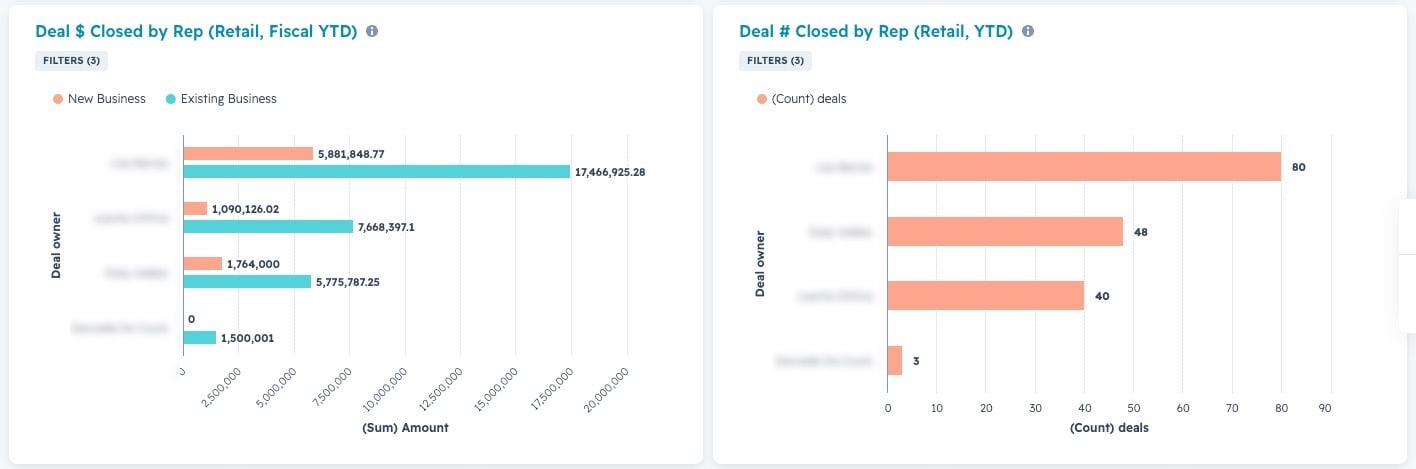
The team performance dashboard replaces your opportunity tracking spreadsheets used at weekly sales meetings. Using the HubSpot dashboard allows all your RM and team reports to update automatically and encourages your RMs to keep their deals up-to-date.
Product Line Dashboards
Either by pipeline, or across all pipelines filtered by product, these product line dashboards can tell you how much revenue you're driving and to see trends across specific product lines.
- Deals opened / closed by product
- Revenue generated by product
- Revenue forecast by product
- Breakdown of Product sales by team
- Time to close, Win Rate and other deal KPIs, by product line
Executive Team Dashboard
How is your business performing overall? High-level dashboards can roll up key business metrics so you can have up-to-date company metrics at your fingertips, without having to ask anyone to run a report for you or have to consolidate different data sources.
Your dashboard can also be set up to automatically send to your inbox on a recurring schedule so you can keep a PDF or excel export of it at your fingertips.
Marketing + Sales Reports
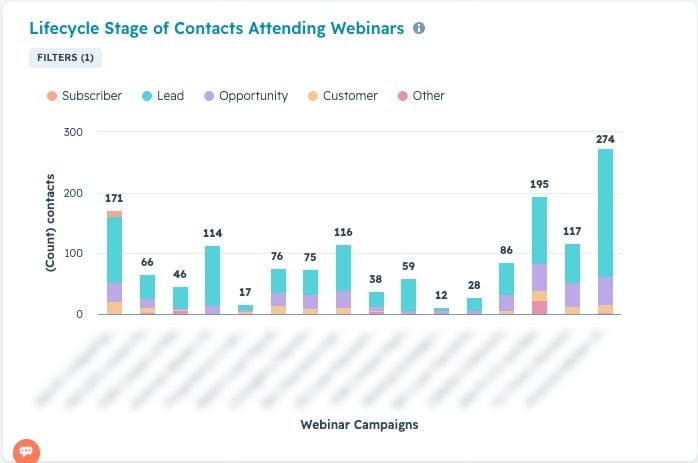
Which marketing initiatives are driving actual sales? Using HubSpot allows you to get better lead attribution so you can see which marketing engagements each contact took before creating or closing their opportunity with you.
Are our webinars attracting new contacts, helping to convert opportunities, or serving current clients?
HubSpot for Finance is Revolutionary
You don't have to do too much customization to make HubSpot work well for your financial services company. Most of our onboarding clients are up and running within a few days to weeks. Bringing in your sales, marketing, and customer service data to one consolidated CRM unlocks massive opportunities for all teams to better service your leads, opportunities and customers.
Ready to get started? Contact us.


Other posts you may be interested in

Top Takeaways from UNBOUND 2026
CRO:NYX Digital Is Heading to HubSpot UNBOUND
HubSpot Dashboards for Financial Services

.png)
.png)
.png)