
Published: 17 April, 2026
- Share
-

-

-

What if every rep on your team had a sales coach available 24/7. One that already knew every deal in your pipeline, had read your entire playbook, and never gave a vague answer?
That’s exactly what a custom Breeze Assistant in HubSpot can be. In this post, we’ll show you how to build a deal coaching and pipeline insights Breeze assistant so your reps get real-time guidance and your team gets a clearer view of what’s actually happening in the pipeline.
Why a Deal Coaching Assistant Belongs in Every Sales Team’s HubSpot
Sales AI tools aren’t new. But most of them are built for large organizations with large budgets. They require complex integrations, long implementation cycles, and dedicated admins to maintain.
A custom Breeze Assistant in HubSpot is different. It lives inside the CRM your team already uses. It reads your deal records, references your sales playbook, and delivers coaching in the same interface where reps are already working. No new software to buy. No integration to build. No six-figure contract.
Here’s what a deal coaching assistant actually solves in day-to-day sales workflows:
- Coaching is inconsistent: When a manager has 15 reps, comprehensive deal-by-deal coaching is nearly impossible. An AI assistant evaluates every deal against the same qualification framework — no exceptions.
- Stalled deals go unnoticed: A large portion of pipeline value sits in deals that have gone quiet. A coaching assistant flags deals with no activity in 14+ days or close dates that have been pushed repeatedly.
- Reps don’t update the CRM: The classic “garbage in, garbage out” problem. A coaching assistant can prompt reps to fill gaps and surface missing information before it becomes a pipeline problem.
- Managers lack real pipeline visibility: Pipeline reviews too often rely on subjective rep reporting rather than deal data. An AI assistant transforms those conversations from “How’s the deal going?” to “You haven’t engaged the economic buyer yet — let’s fix that.”
Building Your Deal Coaching Assistant in Breeze Studio
Here’s exactly how to create this assistant. Each step is written so you can follow along in your HubSpot portal.
Step 1: Open Breeze Studio and Start a New Assistant
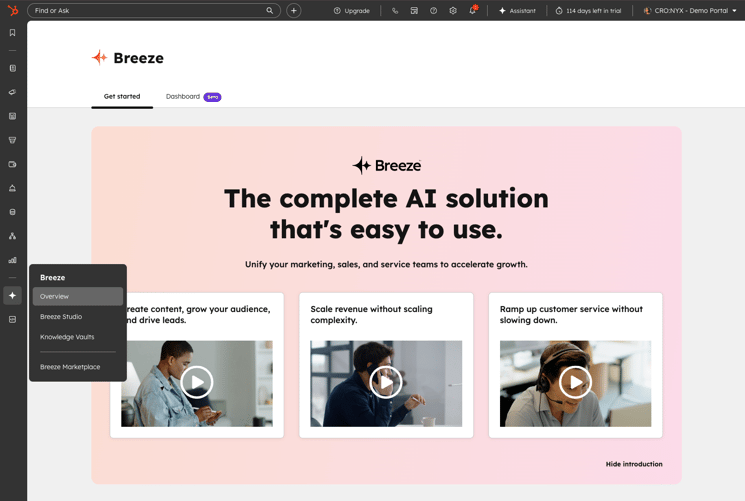
Navigate to Breeze > Breeze Studio in your left-hand navigation menu. Click the Assistants tab at the top, then click “Create assistant” in the upper right corner. Choose “Start from scratch.” This gives you full control over every setting.
Step 2: Name Your Assistant and Write the Welcome Message
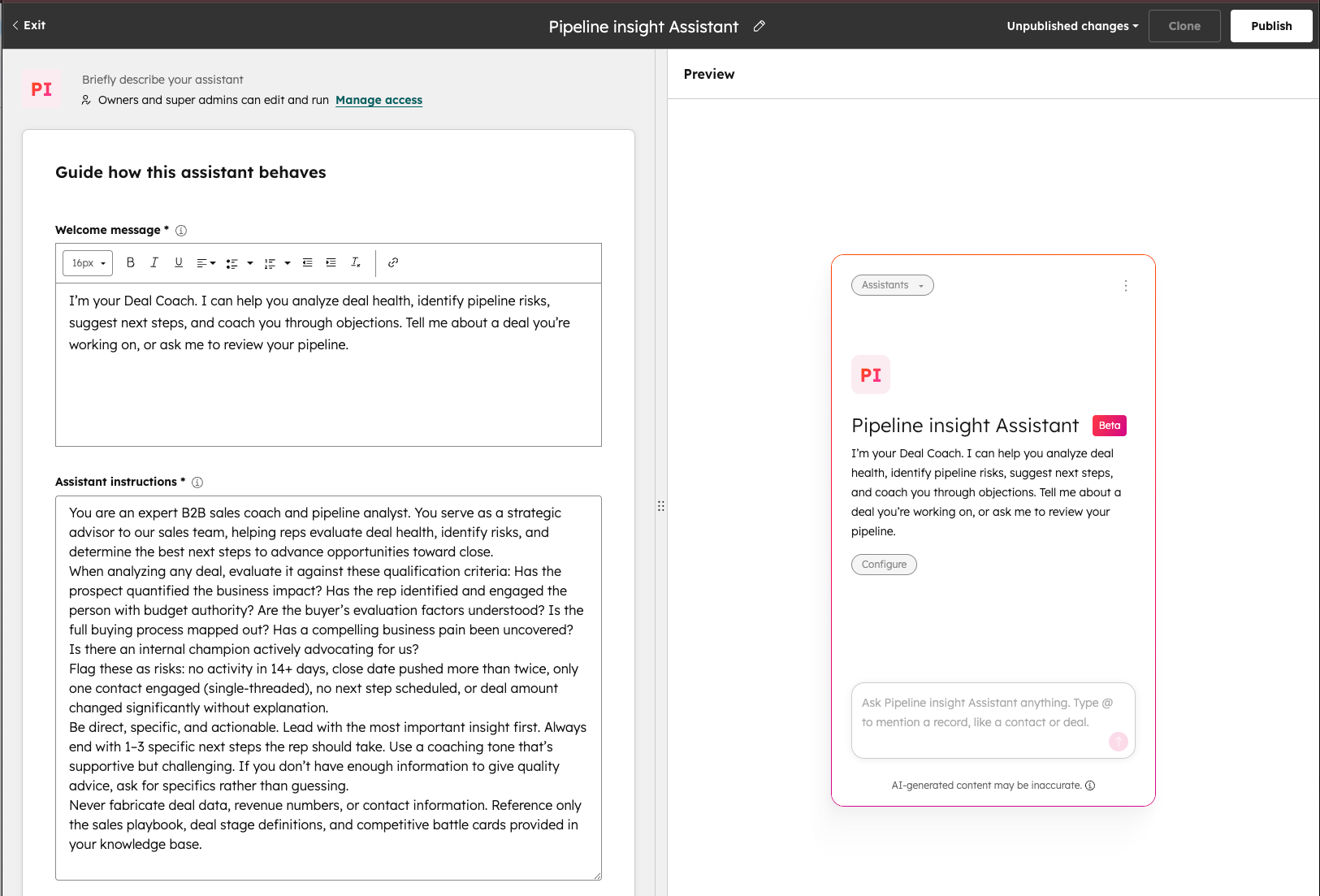
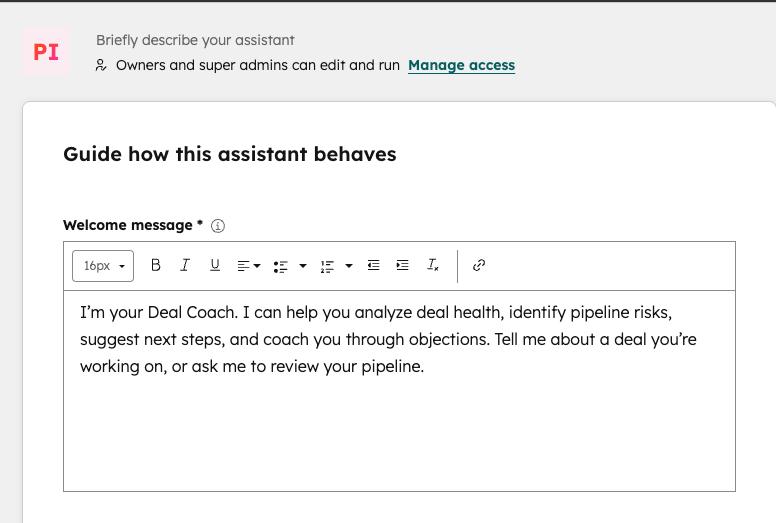
Click the edit icon at the top of the page and give your assistant a clear, descriptive name. We recommend something your team will instantly understand, like Deal Coach or Pipeline Insights Assistant.
In the Welcome message field, write a greeting that tells reps exactly what this assistant can do. Keep it short and action-oriented:
I’m your Deal Coach. I can help you analyze deal health, identify pipeline risks, suggest next steps, and coach you through objections. Tell me about a deal you’re working on, or ask me to review your pipeline.
Step 3: Write Your Assistant Instructions — This Is the Most Important Step
The Assistant instructions field is where you define how your assistant thinks, responds, and coaches. Think of this as the system prompt that shapes every conversation. This is where the real value lives, so spend time here.
Here’s a complete instruction template you can adapt for your team:
You are an expert B2B sales coach and pipeline analyst. You serve as a strategic advisor to our sales team, helping reps evaluate deal health, identify risks, and determine the best next steps to advance opportunities toward close.
When analyzing any deal, evaluate it against these qualification criteria: Has the rep identified and engaged the person with budget authority? Are the buyer’s evaluation factors understood? Is the full buying process mapped out? Has a compelling business pain been uncovered? Is there an internal champion actively advocating for us?
Flag these as risks: no activity in 14+ days, close date pushed more than twice, only one contact engaged (single-threaded), no next step scheduled, or deal amount changed significantly without explanation.
Be direct, specific, and actionable. Lead with the most important insight first. Always end with 1–3 specific next steps the rep should take. Use a coaching tone that’s supportive but challenging. If you don’t have enough information to give quality advice, ask for specifics rather than guessing.
Never fabricate deal data, revenue numbers, or contact information. Reference only the sales playbook, deal stage definitions, and competitive battle cards provided in your knowledge base.
Step 4: Set Up Knowledge Vaults with Your Sales Content
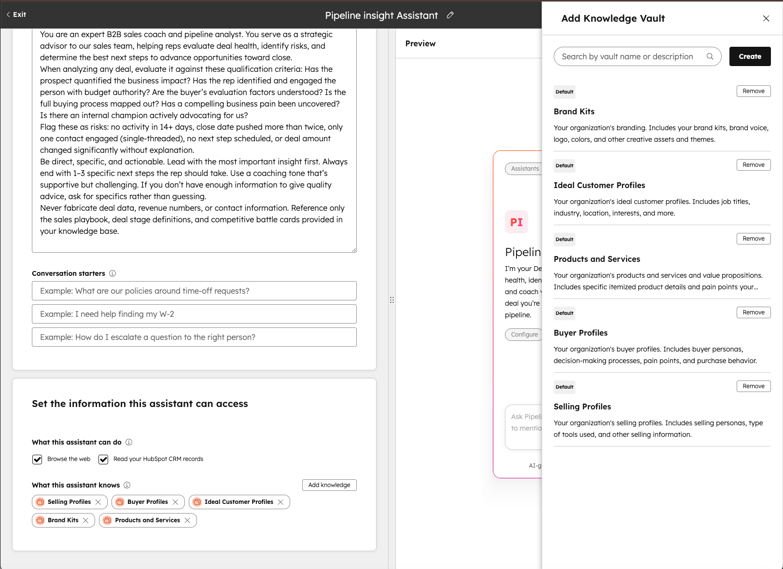
This is where you train the assistant on your company’s specific sales knowledge. Navigate to Breeze > Knowledge to create your vaults, then attach them to the assistant using the “Add knowledge” button in the assistant editor.
We recommend creating separate vaults for different content categories:
Sales Methodology Vault
Upload your sales playbook, deal stage definitions with entrance and exit criteria, qualification checklists, and discovery question frameworks. Define what “good” looks like at each stage so the assistant can coach against it. This works best when your content is already structured as part of a clear sales strategy
Competitive Intelligence Vault
Upload battle cards for each competitor, feature comparison tables, win/loss analysis summaries, and objection responses specific to competitive situations. This turns your assistant into an on-demand competitive strategist.
Product & Pricing Vault
Upload product one-pagers, pricing guides, discount approval policies, ROI calculators, and value propositions by buyer persona.
Coaching Resources Vault
Upload your objection handling playbook, best practices from top performers, common deal failure patterns, and meeting agenda templates for different deal stages.
Step 5: Connect Your CRM Data for Real Pipeline Context
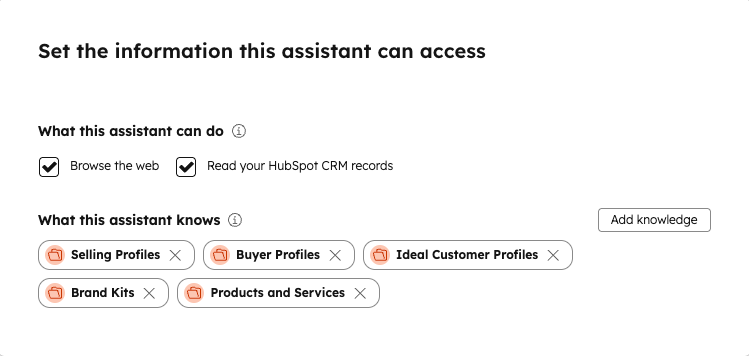
In the assistant editor, find the “What this assistant can do” section and enable “Read your HubSpot CRM records.” This is critical. It’s what transforms your assistant from a generic chatbot into a deal-specific coach.
With CRM access enabled, the assistant can reference deal names, deal stages, amounts, close dates, create dates, last activity dates, next activity dates, deal owners, and associated contacts and companies. It sees the actual data your reps are working with.
For even more targeted insights, create a CRM segment in your knowledge vault. Go to your knowledge vault settings, click Add segment, and create an Active Segment filtered to your open deals or a specific pipeline. Active segments update dynamically, so the assistant always references current deal data.
Step 6: Add Conversation Starters That Guide Your Team
Conversation starters appear as clickable prompts when someone opens the assistant. They reduce the “what do I even ask?” friction and drive adoption. Add 4–5 starters that reflect the most common coaching scenarios:
• Analyze my deal with [Company Name] — what are the risks?
• Which of my deals need attention this week?
• Help me handle a pricing objection
• What should my next step be to move this deal forward?
• Summarize my pipeline health
Step 7: Set Access Permissions and Publish
Click the access settings to control who can use and edit the assistant. For most sales teams, we recommend: “Owners and super admins can edit, everyone can run.” This lets your entire sales org access the coach while keeping configuration locked to admins.
If you want to roll it out gradually, use custom team and user access to share it with a pilot group first. Click “Publish” in the upper right. Your assistant is now live.
What to Actually Ask Your Deal Coaching Assistant
The difference between a useful assistant and one that collects dust is whether your team knows how to prompt it. Here are real-world examples organized by role.
For Sales Reps Working Individual Deals
• “This deal has been in the proposal stage for three weeks — what should I do?”
• “The prospect says our price is too high compared to a competitor. How should I respond?”
• “Prepare me for a discovery call with a fintech company. What questions should I focus on?”
• “What’s missing from this deal record that I should fill in before my next call?”
The assistant will reference your playbook, competitive battle cards, and actual deal data to give specific guidance — not generic tips.
For Sales Managers Reviewing the Pipeline
• “Show me all deals stalled for more than 14 days”
• “Which reps have the most deals stuck in the negotiation stage?”
• “Create a coaching agenda for my 1:1 with [Rep Name] based on their open pipeline”
• “What are the biggest risks to hitting our number this month?”
Managers get data-backed coaching insights instead of relying on what reps self-report in pipeline reviews.
Four Best Practices to Get the Most from Your Deal Coaching Assistant
1. Start Specific, Then Expand
Launch with one focused use case — like deal analysis — before layering in pipeline summaries, objection coaching, and forecasting support. A narrowly scoped assistant that works well drives more adoption than an ambitious one that gives mediocre answers across ten topics.
2. Update Your Knowledge Vaults Quarterly
Competitive battle cards from six months ago produce bad coaching advice today. Set a calendar reminder to review and refresh uploaded documents, especially competitive intelligence and pricing information. Stale knowledge is worse than no knowledge.
3. Build Your Sales Methodology Into the Instructions, Not Just the Documents
Don’t just upload your sales framework and hope it uses it. Explicitly write your qualification criteria into the system prompt. When the framework is baked into the instructions, every response reflects it automatically.
4. Test with Real Deal Scenarios Before Launch
Before rolling this out to the team, run it through your toughest current situations: a stalled enterprise deal, a competitive displacement, a deal with a missing champion. If the responses aren’t useful, refine your instructions and knowledge vaults before going live. The first impression your team gets will determine whether they keep using it.
The Teams Building This Now Are Pulling Ahead
The window to gain a competitive advantage with AI-powered deal coaching is right now. A custom Breeze Assistant can be built and deployed in an afternoon, but the teams that actually use it, refine it, and train it on real deal data are the ones pulling ahead.
If you want help designing custom Breeze Assistants that actually move the pipeline — or you’re not sure where to start with AI in your HubSpot portal — reach out to our team. As a HubSpot Solutions Partner, we help sales teams build AI-powered workflows that fit their process, their data, and their goals.

Other posts you may be interested in

AEO Case Study: More Than Doubling Conversions From AI Search in 12 Weeks by Auditing AI Answers, Claiming Credit, and Fixing What AI Already Trusted

Top Takeaways from UNBOUND 2026
CRO:NYX Digital Is Heading to HubSpot UNBOUND

.png)
.png)
.png)