
Published: 16 October, 2026
- Share
-

-

-

In healthcare, the moment someone reaches out matters. A family member calling about a treatment program, a patient filling out a form at 11 p.m., a physician sending a referral: each one is a person waiting to hear back. When follow-up is slow or missed, they go somewhere else, and your team may never know it happened.
Most healthcare teams don't lose inquiries because they don't care. They lose them because the process lives in inboxes, spreadsheets and people's memory. Healthcare marketing automation in HubSpot fixes that by making sure every inquiry, referral and follow-up has an owner, a next step and a record, without adding more manual work.
As a HubSpot Diamond Partner, we help healthcare providers, treatment organizations and health tech companies put HubSpot automations to work across the patient and customer journey. This guide covers where automation helps most, what to keep human, how to plan before you build, and how to automate safely when sensitive data is involved.
Key takeaways
- HubSpot workflows can route inquiries, escalate missed follow-up, track referral sources and keep people engaged, so nothing falls through the cracks.
- Automation works best when it supports your team. Clinical conversations and sensitive outreach should stay human.
- Plan first. Map your journey, agree on stages and owners, and decide which data is sensitive before you build anything.
- If you store protected health information (PHI) in HubSpot, workflows work differently, and some features can't use sensitive data at all.
- Measure speed to first contact and conversion by source to prove automation is working.
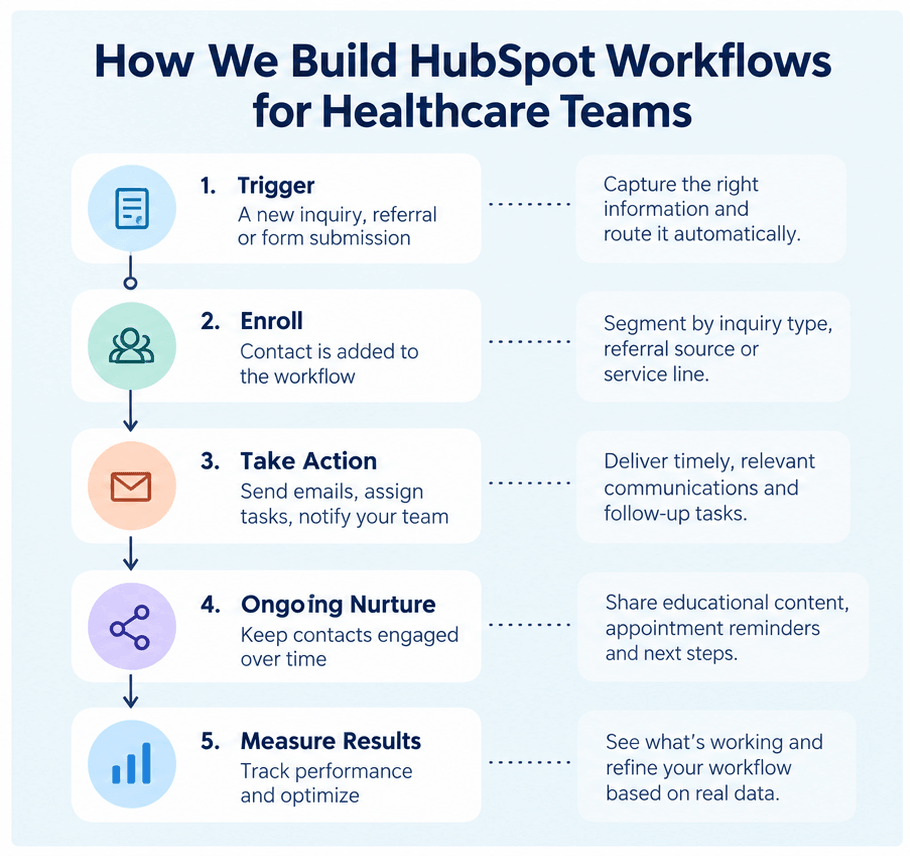
How we build HubSpot workflows for healthcare teams
Most healthcare teams already know they need automation. The harder question is how to build it so it holds up as volume, locations and staff change. Here's how we approach the six areas that matter most, from a HubSpot partner's point of view.
Routing new inquiries to the right person
Every inquiry channel (HubSpot forms, non-HubSpot forms, calls, chat and partner referrals) should land in the same place with the same core properties: inquiry source, service category, location and inquiry date. Contact-based workflows then assign an owner using a "Rotate record to owner" action or branch logic by location or service line, set the lead status, and create a task with a due date. Internal notifications go to the owner and team queue, written without health details. When routing depends on many variables, we often use a single routing workflow with branches instead of one workflow per channel, which keeps the logic in one place.
Escalating inquiries nobody has followed up on
We build escalation around a clear service level agreement (SLA). A workflow enrolls new inquiries, waits for the agreed response window, then checks whether the lead status has changed or an activity has been logged. If not, it alerts a manager, creates a priority task or reassigns the record. Goal criteria remove contacts from the workflow as soon as someone acts, so nobody gets chased for work that's already done.
Tracking referral sources and closing the loop
Referral tracking starts with the data model. Referring organizations live as companies and referring clinicians as contacts, connected to each inquiry through association labels like "Referred by". That lets you report on referral volume and conversion by partner, not just by a free-text field. Organizations that need to track referrals as their own records, with their own stages, can use a custom object on Enterprise. Workflows then handle the busywork: assigning referrals, creating acknowledgement tasks, and prompting the business development team when a top partner's volume drops.
Reminders and re-engagement
Reminders work best when they're driven by a date property synced from your scheduling system or EHR, rather than typed in by hand. Delay-until-date actions handle the timing. For re-engagement, we use lead status and time since last activity to identify stalled inquiries, then enroll them in a short nurture or a sequence owned by an admissions or intake rep. Messages stay general, with no condition or program in subject lines or previews.
Nurturing referral partners
Referral partner nurture is a B2B process that usually involves no patient data, which makes it the safest place to start. We segment partners by type, specialty and referral volume, then build company-based workflows for newsletters, program updates and event invitations, plus recurring check-in tasks for business development. Lead scoring on partner engagement helps the team know who to call next.
Demo-to-sales handoff for health tech and SaaS
For health tech, medtech and healthcare SaaS companies, the journey looks like B2B sales. We combine lead scoring, demo request routing, deal-based workflows that create stage-specific tasks, and sequences for rep follow-up. Lifecycle stages and deal stages are aligned so marketing and sales report on the same funnel, and handoffs are tracked rather than assumed.
What to keep human
The goal of healthcare marketing automation isn't to automate every interaction. It's to make sure the right person has the right conversation at the right time. Some things should stay with your team:
- Clinical conversations. Anything involving symptoms, diagnosis, treatment options or clinical urgency needs a qualified person, not an automated message.
- Sensitive first contact. For services like behavioral health or substance use treatment, the first conversation often shapes whether someone moves forward. A warm call from a person usually works better than an automated email.
- Difficult news and exceptions. Waitlists, coverage issues and declined referrals deserve a human explanation.
- Judgment calls. Automation can flag that something needs attention. A person should decide what happens next.
The best setups use automation for the repetitive steps around those moments: making sure a call happens, logging what was agreed, and prompting the next follow-up.
Plan the architecture before you automate
Automating a broken process just makes it break faster. Before building any HubSpot workflows, get these five things clear:
- Map the journey. Write down what actually happens from first inquiry or referral to admission, appointment or closed deal, including every handoff between teams and where things get stuck.
- Design the data model. Decide which HubSpot objects carry each part of the journey: contacts for patients and family members, companies for referral organizations, deals or a custom pipeline for admissions or intake, and custom objects on Enterprise where you need records like locations, programs or referrals with their own stages. Use association labels to describe relationships, such as "Referred by" or "Primary contact".
- Standardize stages and properties. Agree on lifecycle stages, lead statuses and pipeline stages, and define the core properties every workflow will rely on, like inquiry source, referral source, service category, location and owner. Use dropdowns rather than free text so the data stays reportable.
- Assign ownership. Decide who owns each stage and who owns each workflow. A workflow without an owner is one nobody notices when it breaks.
- Set your data boundaries. Decide what belongs in HubSpot, what stays in your EHR or practice management system, and which properties will be Sensitive Data properties. This shapes how every workflow is built, so do it before anything else.
This planning work often takes less time than people expect, and it saves a lot of rework later.
Connecting your other systems
Automation is only as good as the data feeding it. Appointment dates, admission status and visit outcomes usually live in an EHR or scheduling system, not HubSpot. We typically sync a small set of status fields into HubSpot, like "appointment booked", "admitted" or "no-show", rather than the clinical record. Depending on the systems involved, that can run through a native integration, a middleware platform covered by a BAA, or webhooks and custom code actions in workflows, which require Data Hub Professional or higher. Those status updates then trigger the reminders, follow-up and reporting described above.
Governance that keeps automation reliable
Healthcare portals often outgrow their original setup. A few standards keep workflows manageable as the team grows:
- Naming conventions and folders. Every workflow name shows its object, purpose and owner, so anyone can tell what it does at a glance.
- One job per workflow. Smaller, focused workflows are easier to troubleshoot than one workflow that does everything.
- Documented triggers and exits. Enrollment criteria, re-enrollment rules and goal criteria are written down, so contacts don't end up in conflicting workflows.
- Safe testing. HubSpot sandboxes don't support Sensitive Data, so we test logic in a sandbox with test records, then roll out to production in stages.
- Regular reviews. Quarterly checks for workflows with errors, no recent enrollments or outdated criteria.
Healthcare marketing automation and sensitive data
If your organization stores protected health information in HubSpot, you'll need an Enterprise subscription with Sensitive Data turned on and HubSpot's Business Associate Agreement (BAA) in place. We cover the full setup in our guide, Is HubSpot HIPAA Compliant?
Once Sensitive Data is on, workflows behave a little differently. At a high level:
- What works: Sensitive properties can be used in filter-based enrollment and in if/then branches, so you can still route and segment based on them.
- What doesn't: Sensitive values can't appear in personalization tokens, be copied between properties, or trigger workflows when they change.
- What it means in practice: The most reliable automations run on non-sensitive information, like lifecycle stage, inquiry source, owner, location or a general service category. Keep the sensitive details in protected properties for the people who need them.
A few habits keep automation safe:
- Keep patient details out of internal notification emails, task titles and email subject lines.
- Restrict who can create and edit workflows.
- Make sure any tool connected to your workflows, such as SMS, calling or scheduling apps, is covered by its own BAA if it receives PHI.
- For substance use treatment programs in the US, 42 CFR Part 2 adds stricter consent rules, including for updates shared with referral partners.
- Outside the US, apply the privacy laws for your region, such as PIPEDA or PHIPA in Canada, GDPR in the UK and EU, or the Data Protection Act in the Cayman Islands.
None of this stops you from automating. It just means the workflows need to be designed with your data boundaries in mind from the start.
How to measure whether automation is working
Automation should make a measurable difference. These are the metrics we track most often for healthcare clients:
|
Metric |
What it tells you |
|---|---|
|
Speed to first contact |
How quickly new inquiries hear back from your team |
|
Inquiries with no follow-up |
How many inquiries are slipping through the cracks |
|
Inquiry-to-admission or appointment rate |
How well inquiries turn into patients or clients |
|
Conversion by source |
Which campaigns, channels and referral sources bring in people who actually convert |
|
Referral partner performance |
Which partners send the most referrals, and which convert best |
|
Time in stage |
Where people get stuck in your process |
Set a baseline before you launch new workflows, then compare after a few months. If a number isn't improving, the workflow, the process or the data behind it needs another look.
In HubSpot, most of these come from custom reports and funnel reports built on your lifecycle stages and pipelines, pulled together into a dashboard for each team. Organizations on Marketing Hub Enterprise can add multi-touch attribution to see which campaigns and channels contribute to admissions or closed deals, not just first inquiries. The reports are only as reliable as the stages and source properties behind them, which is why the planning work above matters.
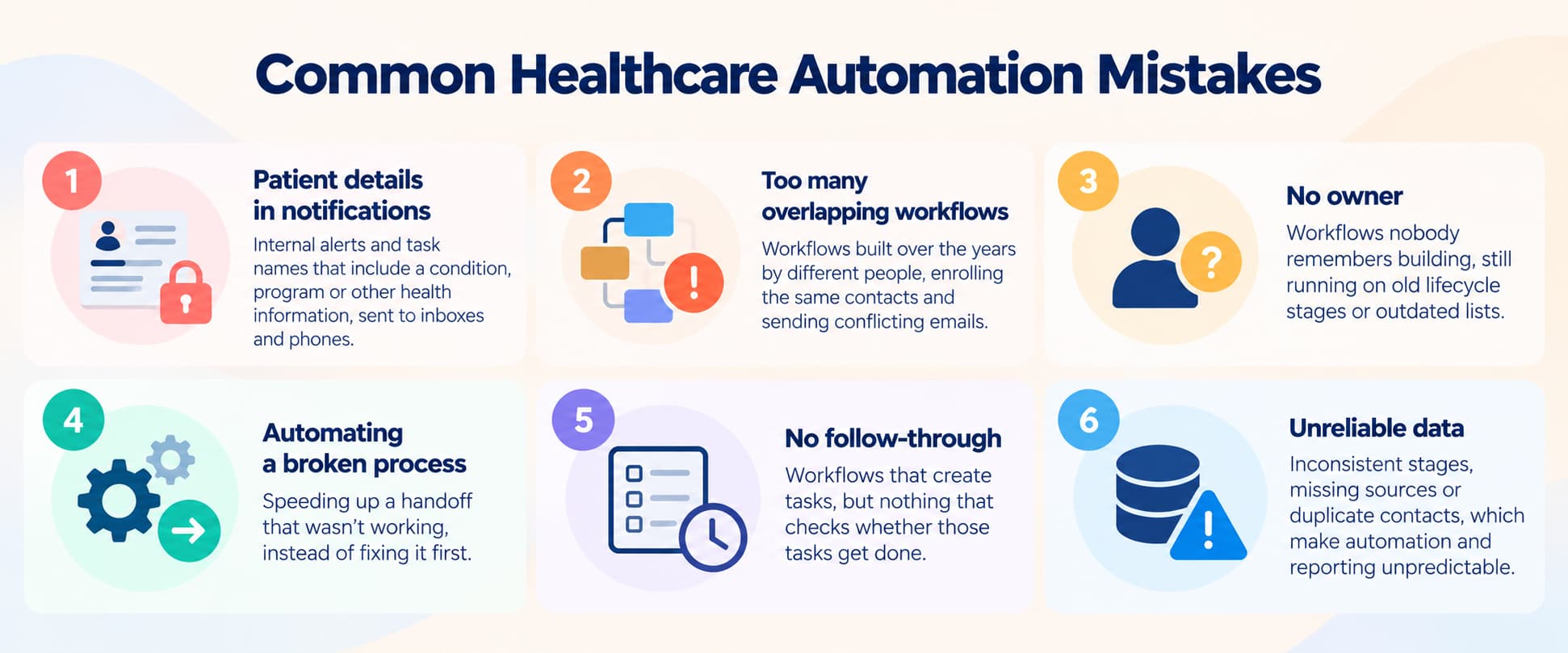
Common healthcare automation mistakes
These are the issues we see most often when we audit healthcare HubSpot portals:
- Patient details in notifications. Internal alerts and task names that include a condition, program or other health information, sent to inboxes and phones.
- Too many overlapping workflows. Workflows built over the years by different people, enrolling the same contacts and sending conflicting emails.
- No owner. Workflows nobody remembers building, still running on old lifecycle stages or outdated lists.
- Automating a broken process. Speeding up a handoff that wasn't working, instead of fixing it first.
- No follow-through. Workflows that create tasks, but nothing that checks whether those tasks get done.
- Unreliable data. Inconsistent stages, missing sources or duplicate contacts, which make automation and reporting unpredictable.
Already have workflows that aren't working?
Many healthcare teams aren't starting from scratch. They have a HubSpot portal full of workflows built at different times, by different people, for processes that have since changed. Turning things off or rebuilding them without a plan can break routing, reporting and integrations your team relies on.
As a HubSpot Diamond Partner, we start by reviewing what's already there: which workflows are active, what they do, where they overlap, and whether any sensitive data is ending up where it shouldn't. From there, we fix things in a planned order so your team keeps working while we clean up.
Learn more about our HubSpot for Healthcare services, or start with a review of your current setup.
Frequently asked questions
What is healthcare marketing automation?
Healthcare marketing automation uses software like HubSpot to handle repetitive steps in the patient or customer journey, such as routing inquiries, sending reminders, creating follow-up tasks and tracking referral sources, so staff can focus on conversations that need a person.
Can HubSpot workflows manage patient inquiries and referrals?
Yes. HubSpot workflows can assign inquiries and referrals to the right person, create follow-up tasks, escalate anything that hasn't been contacted, and track each one through to an admission, appointment or closed deal.
Can we use HubSpot workflows if we store PHI?
Yes, with an Enterprise subscription, Sensitive Data turned on and HubSpot's BAA in place. Sensitive properties can be used in enrollment filters and branches, but not in personalization tokens, copy property actions or change-based triggers.
Should we automate patient communication?
Automate the routine parts, like confirmations, reminders and gentle re-engagement. Keep clinical conversations, sensitive first contact and difficult news with your team.
Where should we start with healthcare marketing automation?
Start with inquiry routing and follow-up escalation. They're usually the quickest wins, because they stop inquiries from being missed. Referral partner nurture is another good early step, since it rarely involves patient data.
We already have HubSpot workflows. Should we rebuild them?
Not necessarily. Start with an audit to see what's active, what overlaps and what's no longer needed. Then fix or retire workflows in a planned order so you don't break routing or reporting along the way.

Other posts you may be interested in

HubSpot HIPAA Compliance: A Guide for Healthcare Organizations

.png)
.png)
.png)